
HEADLESS USAGE MONETIZATION
UsageCloud™ MCP Server
Ask what a stream does, what changed, or what is failing, and get the answer in Claude, ChatGPT, Codex or your IDE. Get suggestions on what to improve, and build new streams from a description. Headless makes your usage monetization more transparent, and faster to maintain and evolve.
The Answer is There. The Path is the Work.
The logic that turns usage into revenue accumulates. Hundreds of streams, thousands of configuration decisions, years of choices. The reasoning behind each one sits with whoever made it. Every monetization model you launch or change starts by understanding what is already configured.
The answer is already in UsageCloud. Now every engineer in the team has a faster path to it.
Ask What You Need to Know. Describe What You Need Done.
Headless usage monetization means operating your data mediation, metering, entitlements and pricing through an AI assistant. The UI stays for visual work and deep inspection. Headless makes the logic behind usage monetization easier to reach, share, and act on.
Understand any stream without chasing context
Ask what a stream or solution does and get a walkthrough from source to destination, with the reasoning behind it. Ask what is failing, or what changed between versions, and get the answer in plain language without depending on the person who built it or digging through documentation.
Turn streams into a shared operational map
Ask how a solution works end to end: where data enters, which streams transform or enrich it, where it is forwarded, and which stream to inspect first when something breaks. This turns a collection of streams into an operational map your whole team can use. Incidents route faster. Handoffs need less context. Reviews start from the same map.
Get a second opinion on any stream
Get an analysis of any stream: where it can run leaner, which platform functions do the job better, where it can sit closer to best practice. A fast, repeatable way to review and fine-tune your configurations.
Build from intent, not from scratch
Describe the outcome. The AI assistant selects the functions, connects them, and applies patterns that already work, so a new stream starts from proven practice and reaches production sooner.
Operate Through the Tools You Already Use
UsageCloud connects to AI assistants through the Model Context Protocol: Claude, Claude Code, ChatGPT, Codex, VS Code with GitHub Copilot, and GitHub Copilot CLI. Same account, same permissions.
See Headless Usage Monetization in Action.
Ask your AI assistant what a stream does and get its logic step by step.
Ask your AI assistant what changed in a stream and get the difference between versions.
Ask your AI assistant how metered totals are sent and get what to check and set up.

The Operational Shift
CONTINUITY AND CAPACITY
Every engineer can work on any stream
The AI assistant explains what a stream collects, how it transforms and validates, where it delivers, and why it was built that way. An engineer covering on-call, taking over streams someone else built, or joining last week reads it and understands it.
CONTINUOUS OPTIMIZATION
Keep your streams lean as you scale
A review is one question to your AI assistant, so fine-tuning becomes part of everyday engineering work. Your streams run with fewer steps, less custom script, and follow best practice. Usage volume grows faster than the cost of processing it.
SPEED TO MONETIZE
Ship new monetization models faster
Describe what a new product or metering dimension needs, and get a draft of the stream behind it to review. New monetization models reach production sooner, and more of your team can build them.
How UsageCloud MCP Server Works
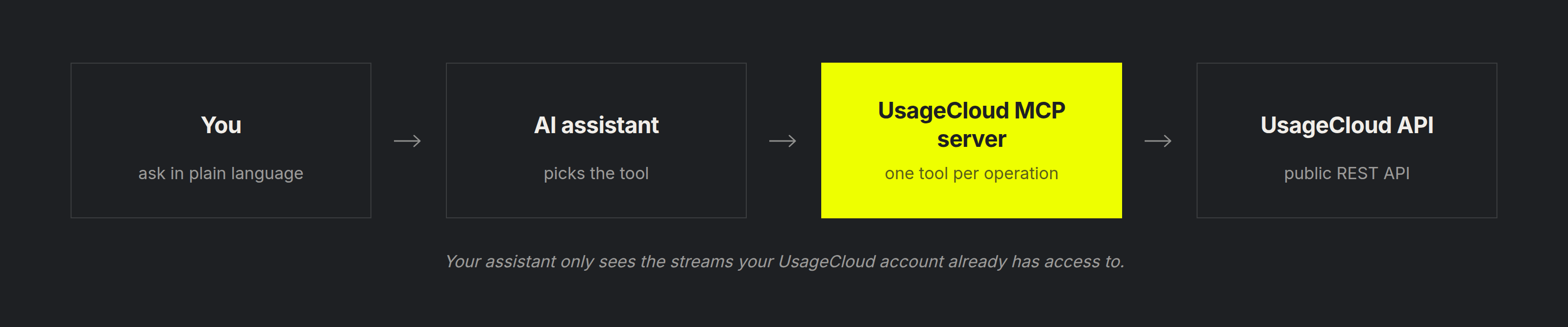
New Access. Same Boundaries.
01
Your Permissions
Every request runs under your own account and sees what that account sees.
02
Admin-enabled
An administrator turns MCP access on for the tenant.
03
It reads, recommends and drafts. You decide.
Nothing changes in UsageCloud unless you ask for it and approve it.
04
EU or US
Separate regional endpoints. How configuration data is handled, retained and logged.
FAQ
Headless usage monetization means operating your data mediation, metering, entitlements and pricing through an AI assistant. With the UsageCloud MCP Server, your engineers use AI assistants such as Claude and ChatGPT to ask, in plain language, how their monetization streams work, how they are running and how they could be improved, and to build new ones. It works alongside UsageCloud’s own interface.
MCP is the Model Context Protocol, an open standard for connecting AI applications to software platforms. An MCP server exposes a defined set of operations an assistant can call, and only those.
Six are tested and documented: Claude, Claude Code, ChatGPT, Codex, VS Code with GitHub Copilot, and GitHub Copilot CLI. Claude requires a paid plan. ChatGPT requires developer mode.
Not today. Connections run through OAuth against an allow list of client callback URLs, so every request carries a named user and their own permissions. The six clients above are the supported route.
No. The UI stays for visual work and deep inspection. Headless is for everything faster to ask than to find.
Your streams and solutions, their configuration, their version history and their runtime status, and only what your own account can already see.
No. Reading changes nothing. A suggestion changes nothing on its own. Anything built is something you asked for and reviewed before it goes anywhere.
An administrator grants stream management scope. You connect the MCP server in your AI client and enroll your UsageCloud access key once using the credentials from Application Access. The enrollment carries over to every other client you connect.
On DigitalRoute’s infrastructure, in the EU or the US. Nothing runs in your environment.
The assistant names the tools it called and works from the stream’s own configuration, so every answer is checkable against the stream itself. Where a stream is annotated it explains intent; where it is not, it describes structure and behavior.
UsageCloud Private has its own capability set and its own vocabulary. See the UsageCloud Private documentation.